By Anergy Academy
Malinois is in testing and not yet available to install. It is not listed in the Shopify App Store.

Malinois Site Dog — Your Shopify SEO & GEO Watchdog
A read-only technical audit that runs inside Shopify Admin. Malinois checks what search engines and AI crawlers can actually reach and read on your store, sorts the results into a clear to-do list, and gives you a ready-made prompt to fix each issue with your own AI tool, after you approve it.
Ask about Malinois See how it works
Who it’s for
- Shopify merchants who want to know whether their store is technically ready for search, before and after launch.
- Amazon sellers building their own Shopify brand site, who know marketplace listings but are new to how search engines and AI tools read a website.
- Ecommerce brand operators who need one consistent checklist across products, pages and menus.
- Anergy Academy training participants learning to build and maintain Shopify stores with AI agents.
- SEO and GEO learners who want to see technical checks applied to a real store, with evidence for every result.
Why Malinois
See your store the way crawlers do
Search engines and AI answer engines can only use pages they can reach and parse. Malinois checks the technical basics they depend on: access, robots.txt, sitemaps, canonical tags, titles, descriptions, headings, image alt text, structured data and internal links.
Know what to do first
Every finding is sorted into Fix recommended, Review merchant intent, Optional optimization or Expected. The Priority Action Center lists the products and pages that need work, highest priority first.
Understand why, with evidence
Each finding says what was observed, why it matters and what to do, and links to the technical evidence behind it. Nothing is a black-box score.
Fix with your approval, not automatically
Copy a ready-made fix prompt into your own AI tool. The prompt asks the tool to confirm it is connected to the same store, show you the exact change and wait for your approval. Then re-audit to confirm.
Read-only by design
Malinois asks Shopify for read-only access to products, online store pages and navigation. It never edits your store.
Overview dashboard
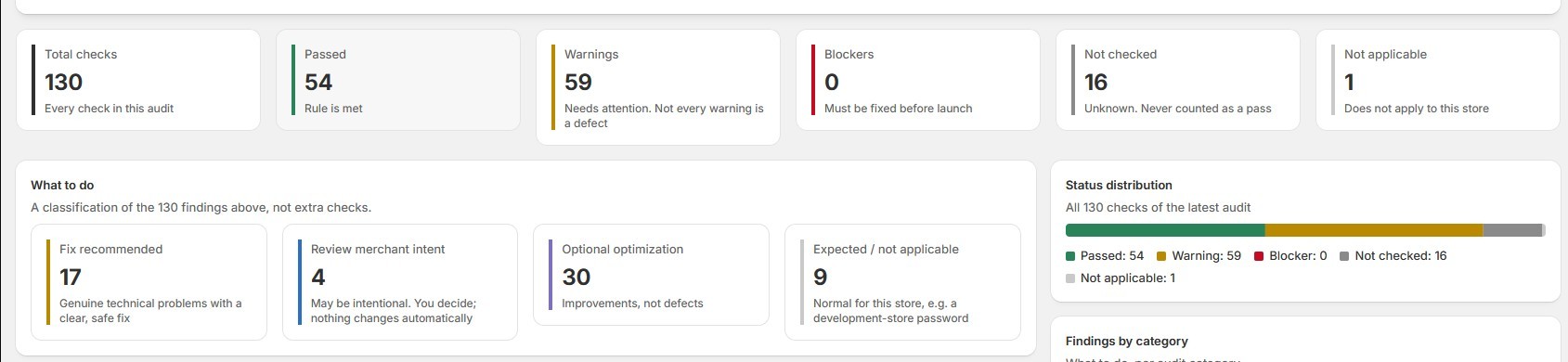
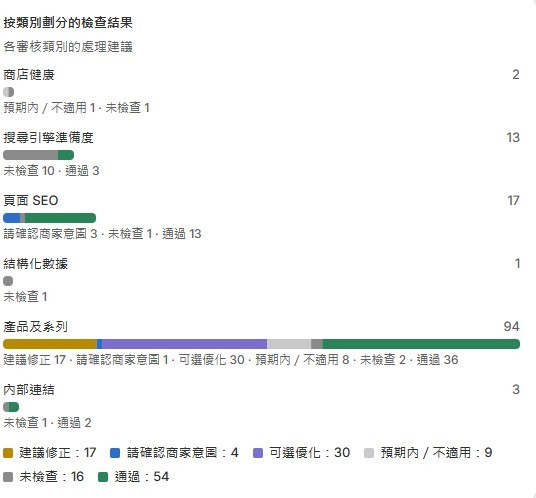
Total checks and the count for each status: Passed, Warnings, Blockers, Not checked and Not applicable. A “What to do” panel turns those results into action groups, and charts show the status distribution and the findings in each audit category.
Technical SEO and GEO readiness checks in six categories:
- Store Health: storefront password, page status codes, redirects, consistent responses to different crawlers
- Search Engine Readiness: robots.txt, AI-crawler rules, noindex, canonical tags, sitemap
- On-Page SEO: titles, meta descriptions, headings, image alt text, page language, mobile viewport
- Structured Data: Product, Organization, Breadcrumb and Article JSON-LD
- Products & Collections: SEO fields and image alt text in Shopify Admin, thin descriptions, duplicate titles, publication state, sitemap coverage
- Internal Links: broken links, broken menu items, published pages nothing links to
Priority Action Center
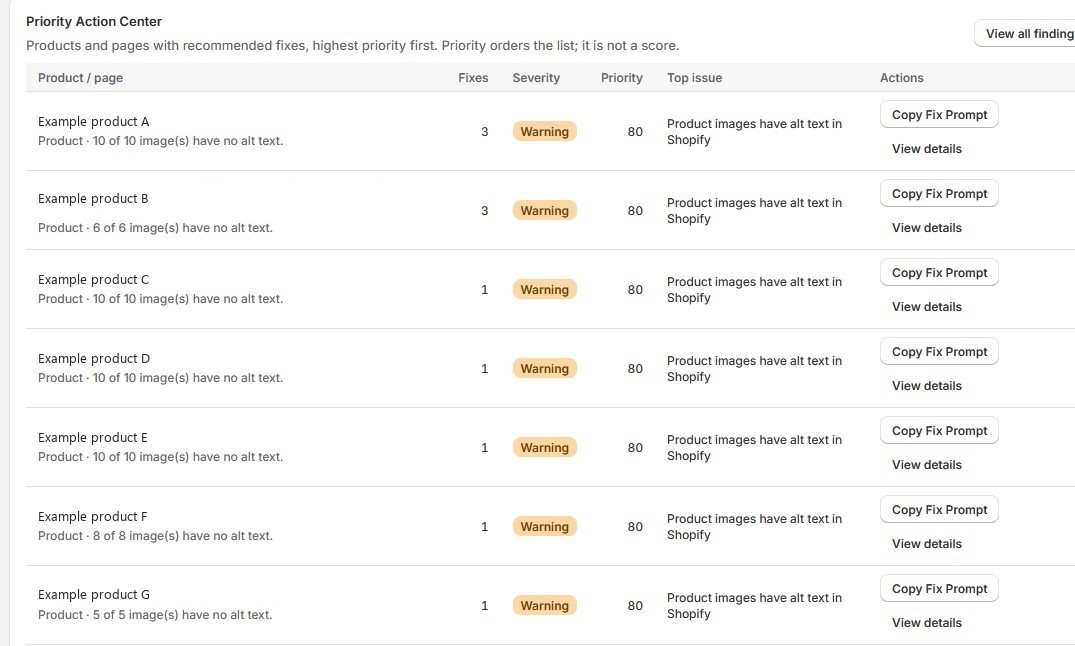
Products and pages with recommended fixes, ordered by priority. Priority orders the list; it is not a score of your store.
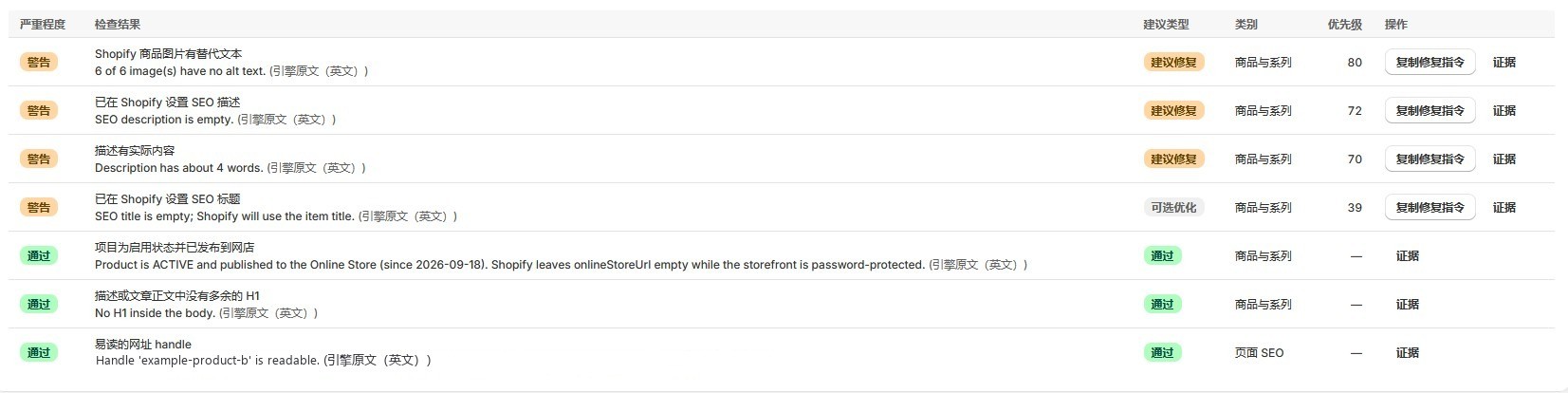
Findings grouped by product and page
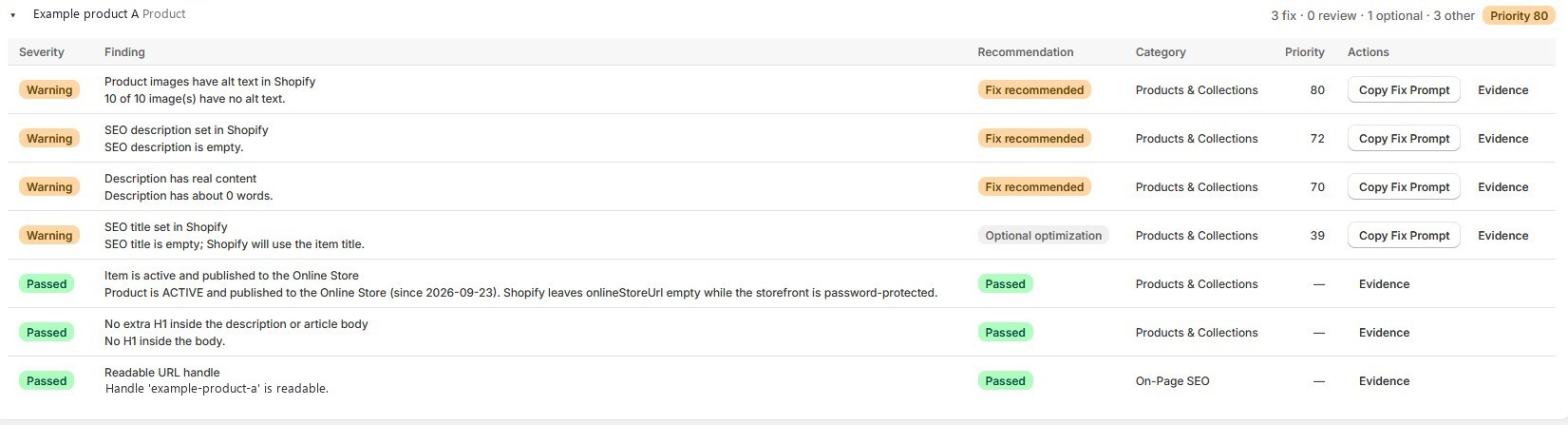
Every finding for a product or page in one place, with severity, recommendation, category, priority and evidence.
Three kinds of recommendation
- Fix recommended: a genuine technical problem with a clear, safe fix.
- Review merchant intent: may be deliberate, such as a product that is active but not on the Online Store. You decide; nothing is suggested by default.
- Optional optimization: an improvement, not a defect. For example, an empty SEO title is a warning, but Shopify already uses the product title instead.
Copy Fix Prompt, Copy Review Prompt and Copy All Priority Fixes
Malinois writes a prompt for the AI coding tool you use with your own Shopify connection (the prompts are written for Codex). The prompt includes your store’s identity, the finding, the evidence and the suggested Shopify change, and tells the tool to propose the change and wait for your approval. Review prompts only ask the tool to explain the options and change nothing. Prompts never contain access tokens.
Re-audit and Audit History
Run the audit again after a change. Malinois compares it with the previous audit and shows what was resolved, what is still open and what is new. An issue counts as resolved only when the new audit observes it passing. Audit History lists past audits and lets you compare any two. If Malinois’s own checks changed between two audits, the comparison says so instead of claiming fixes.
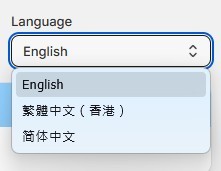
English, Traditional Chinese (Hong Kong) and Simplified Chinese
Switch the interface language at any time; your choice is saved for your store. Technical detail lines from the audit engine stay in English and are labelled as such.
Honest about what it could not check
A password-protected storefront blocks public-page checks; Malinois says so, marks those checks “Not checked” and still runs the Shopify Admin checks. If some store data or pages can’t be read (for example because Shopify rate-limits requests), the affected checks are also “Not checked”. “Not checked” is never counted as a pass.
Each store sees only its own data
The store is identified from Shopify’s signed session, not from anything a browser sends. Access tokens are encrypted and never shown in the browser, prompts or reports.
How Malinois works
- Open Malinois in Shopify Admin. It loads inside your admin and connects with Shopify’s read-only permissions. There is no separate login.
- Run an audit. Malinois reads your products, pages and menus through Shopify’s read-only API and visits a sample of your public pages. An audit usually takes 1–3 minutes.
- Read the results. Start with the Overview, then the Priority Action Center. Open a product or page to see each finding, why it matters and its evidence.
- Copy a fix prompt. Paste it into your own AI tool that is connected to your store. The tool checks it is the same store, proposes the exact change and waits for your approval.
- Re-audit. Return to Malinois and run the audit again. Only a passing result counts as fixed.
Copying a prompt changes nothing by itself. Malinois never edits your store.
Screenshot gallery
Screenshots show the real Malinois interface. The numbers and product names come from Anergy Academy’s own test store and are examples only. Your results will differ, and they are not a measure of search performance.
FAQ
Is Malinois available in the Shopify App Store?
Not yet. Malinois is in testing and is not listed in the Shopify App Store, and there is no public install link. If you’re interested, contact Anergy Academy.
Does Malinois change my store?
No. It has read-only access to products, online store pages and navigation, and it refuses any write request. Changes happen only in your own tool, after you approve them.
What is a Fix Prompt?
A ready-made set of instructions for the AI coding tool you already use with your own Shopify connection. It describes the issue, the evidence and the suggested change, and tells the tool to confirm the store, propose the change and wait for your approval. Malinois itself does not apply it.
Do I need Codex or another AI tool?
Only if you want to use the prompts. You can also make each change by hand in Shopify Admin, using the recommendation and evidence.
Is Malinois an AI content writer?
No. Malinois diagnoses technical issues. It doesn’t write or rewrite product descriptions or other content.
Is every warning a problem?
No. A warning means the check found something worth a look. The recommendation tells you whether it is a fix, a decision for you, an optional improvement or expected for your store.
Why do some checks say “Not checked”?
Malinois couldn’t verify them, for example because the storefront is password-protected or a page couldn’t be fetched. “Not checked” is never treated as a pass.
My store has a password. Can I still use Malinois?
Yes. Public-page checks can’t run while the storefront is protected, but the Shopify Admin checks still run. Don’t remove the password just to pass an audit; remove it when you’re ready to launch.
Will Malinois improve my Google rankings or get my store cited by AI tools?
No tool can promise that. Malinois finds and explains technical barriers. It doesn’t measure or predict rankings, traffic or AI citations.
Does it check whether Google has indexed my pages?
No. Only Google Search Console or Bing Webmaster Tools can confirm indexing, and Malinois is not connected to them.
What data does Malinois read and keep?
It reads products, online store pages and navigation, never orders or customers. It keeps your store’s name and domain and the audit results (page URLs, titles, SEO fields) for 180 days. Uninstalling deletes its access tokens immediately; Shopify’s data-removal request then deletes the store’s data.
Which languages does it support?
The interface is available in English, Traditional Chinese (Hong Kong) and Simplified Chinese. Technical detail lines from the audit engine are shown in English.
How much does it cost?
Pricing has not been announced.
Interested in Malinois?
Malinois is in testing and not yet available to install. Tell us about your store or your team, and we’ll let you know when we have more to share.
Limitations and disclosure
Malinois Site Dog is a read-only technical audit tool by Anergy Academy. It does not edit your store, write content, or connect to Google Search Console or Bing. Fix prompts are handed to a separate tool that uses your own authorised Shopify connection; you approve every change there. A warning is not necessarily a defect. A password-protected storefront prevents public-page checks. Each audit samples a limited number of public pages. Malinois does not guarantee search rankings, AI citations or traffic. Malinois is in testing: it is not listed in the Shopify App Store, has no public install link, and applying a fix prompt end-to-end has not yet been demonstrated in our testing. Shopify is a trademark of Shopify Inc.; Malinois is not made or endorsed by Shopify.
Anergy Academy 出品
Malinois 仍在測試階段,暫未開放安裝,亦未在 Shopify App Store 上架。

Malinois Site Dog —— 你的 Shopify SEO 及 GEO 看門狗
一個在 Shopify 管理後台內運行的唯讀技術審核工具。Malinois 檢查搜尋引擎和 AI 爬蟲在你的網店實際上能存取和讀取甚麼,把結果整理成清晰的待辦清單,並為每個問題準備好修正指令,讓你在核准後用自己的 AI 工具處理。
適合誰使用
- Shopify 商戶:想在開店前後確認網店在技術上是否已準備好被搜尋。
- 建立自家 Shopify 品牌網站的 Amazon 賣家:熟悉平台上架,但剛開始了解搜尋引擎和 AI 工具如何讀取網站。
- 電商品牌營運人員:需要一套一致的清單,檢查產品、頁面和選單。
- Anergy Academy 課程學員:學習用 AI 代理建立和維護 Shopify 網店。
- SEO 及 GEO 學習者:想看到技術檢查如何應用在真實網店上,而且每個結果都有證據。
為甚麼選擇 Malinois
用爬蟲的角度看你的網店
搜尋引擎和 AI 問答引擎只能使用它們存取得到、讀得懂的頁面。Malinois 檢查它們依賴的技術基礎:存取權限、robots.txt、sitemap、canonical 標籤、標題、描述、標題層級、圖片替代文字、結構化數據和內部連結。
知道先做甚麼
每項結果都會歸類為「建議修正」、「請確認商家意圖」、「可選優化」或「預期內」。「優先行動中心」按優先次序列出需要處理的產品和頁面。
有證據,知道原因
每項結果都說明觀察到甚麼、為何重要、應該怎樣做,並附上技術證據,不是一個無從解釋的分數。
經你核准才修正,不會自動更改
把現成的修正指令貼到你自己的 AI 工具。指令會要求工具先確認連接的是同一間商店,列出確實的修改內容,並等待你核准。之後重新審核確認結果。
設計上只讀不寫
Malinois 只向 Shopify 申請產品、網店頁面和導覽選單的唯讀權限,絕不修改你的網店。
概覽儀表板
顯示檢查總數及各狀態數量:通過、警告、阻礙、未檢查和不適用。「下一步」面板把結果整理成行動類別,圖表顯示狀態分佈及各審核類別的結果。
技術 SEO 及 GEO 準備度檢查,分為六個類別:
- 商店健康: 店面密碼、頁面狀態碼、重新導向、對不同爬蟲的回應是否一致
- 搜尋引擎準備度: robots.txt、AI 爬蟲規則、noindex、canonical 標籤、sitemap
- 頁面 SEO: 標題、meta 描述、標題層級、圖片替代文字、頁面語言、行動裝置 viewport
- 結構化數據: Product、Organization、Breadcrumb 及 Article 的 JSON-LD
- 產品及系列: Shopify 後台的 SEO 欄位及圖片替代文字、內容過少的描述、重複標題、發佈狀態、sitemap 涵蓋範圍
- 內部連結: 失效連結、失效的選單項目、沒有任何連結指向的已發佈頁面
優先行動中心
按優先度列出需要修正的產品和頁面。優先度只用來排序,並不是網店評分。
按產品及頁面分組的檢查結果
同一產品或頁面的所有結果集中顯示,包括嚴重程度、處理建議、類別、優先度和證據。
三種處理建議
- 建議修正: 真正的技術問題,有清晰而安全的修正方法。
- 請確認商家意圖: 可能是刻意安排,例如產品已啟用但未在網上商店發佈。由你決定,預設不會建議任何更改。
- 可選優化: 屬於改進,並非錯誤。例如 SEO 標題留空會顯示警告,但 Shopify 已自動沿用產品標題。
複製修正指令、複製檢視指令及複製所有優先修正
Malinois 為你搭配自己 Shopify 連線使用的 AI 編程工具撰寫指令(指令以 Codex 為對象)。指令包含商店身份、問題、證據和建議的 Shopify 操作,並要求工具先提出修改、等待你核准。檢視指令只會請工具解釋選項,不作任何更改。指令中絕不包含存取權杖。
重新審核及審核歷史
完成修改後再次審核,Malinois 會與上一次審核比較,顯示已解決、仍未解決和新出現的問題。只有新審核觀察到「通過」,問題才算已解決。「審核歷史」列出過往審核,可任選兩次比較。如果兩次審核之間 Malinois 本身的檢查規則有更新,比較結果會清楚說明,而不會聲稱問題已修正。
英文、繁體中文(香港)及簡體中文
隨時切換介面語言,選擇會按商店儲存。審核引擎的技術說明保留英文原文,並清楚標示。
如實交代未能檢查的項目
店面設有密碼時,公開頁面的檢查無法進行;Malinois 會清楚說明,把相關檢查標示為「未檢查」,並照常執行 Shopify 後台檢查。如部分商店數據或頁面無法讀取(例如 Shopify 限制請求頻率),相關檢查同樣標示為「未檢查」。「未檢查」永遠不會當作通過。
每間商店只看到自己的數據
商店身份來自 Shopify 簽署的工作階段,而不是瀏覽器傳送的任何資料。存取權杖經加密保存,絕不會出現在瀏覽器、指令或報告中。
Malinois 如何運作
- 在 Shopify 管理後台開啟 Malinois。 應用程式在後台內載入,以 Shopify 的唯讀權限連接,無需另外登入。
- 開始審核。 Malinois 透過 Shopify 唯讀 API 讀取產品、頁面和選單,並抽樣造訪公開頁面,一般需時 1 至 3 分鐘。
- 查看結果。 先看「概覽」,再看「優先行動中心」。打開某件產品或某個頁面,查看每項結果、原因和證據。
- 複製修正指令。 貼到已連接你網店的 AI 工具。工具會確認是同一間商店,提出確實的修改內容,並等待你核准。
- 重新審核。 回到 Malinois 再審核一次,只有「通過」才算修正完成。
單純複製指令不會改變任何東西。Malinois 絕不修改你的網店。
截圖說明
截圖為 Malinois 的真實介面。圖中數字和產品名稱來自 Anergy Academy 自己的測試商店,僅作示例。你的結果會有所不同,亦不代表搜尋表現。
常見問題
Malinois 已在 Shopify App Store 上架嗎?
暫時未有。Malinois 仍在測試階段,未在 Shopify App Store 上架,亦沒有公開的安裝連結。如有興趣,歡迎聯絡 Anergy Academy。
Malinois 會修改我的網店嗎?
不會。它只有產品、網店頁面和導覽選單的唯讀權限,並會拒絕任何寫入請求。所有修改只會在你自己的工具中、經你核准後進行。
甚麼是修正指令?
一套現成的指示,給你已連接自己 Shopify 商店的 AI 編程工具使用。指令說明問題、證據和建議的修改,並要求工具先確認商店、提出修改、等待你核准。Malinois 本身不會執行。
一定要用 Codex 或其他 AI 工具嗎?
只有使用指令時才需要。你也可以參考處理建議和證據,在 Shopify 後台手動修改。
Malinois 是 AI 內容寫作工具嗎?
不是。Malinois 負責診斷技術問題,不會撰寫或改寫產品描述或其他內容。
每個警告都代表有問題嗎?
不是。警告代表檢查發現值得留意的地方。處理建議會告訴你,這是需要修正、由你決定、可選優化,還是對你的商店屬預期內。
為甚麼有些檢查顯示「未檢查」?
Malinois 無法確認這些項目,例如店面設有密碼或某個頁面無法讀取。「未檢查」永遠不會當作通過。
我的網店設有密碼,還可以用 Malinois 嗎?
可以。店面受保護時無法檢查公開頁面,但 Shopify 後台檢查會照常執行。不要為了通過審核而移除密碼,準備好開店時才移除。
Malinois 能提升我的 Google 排名,或令 AI 工具引用我的網店嗎?
沒有任何工具能作出這樣的保證。Malinois 找出並解釋技術障礙,不會衡量或預測排名、流量或 AI 引用。
它會檢查 Google 是否已索引我的頁面嗎?
不會。只有 Google Search Console 或 Bing Webmaster Tools 才能確認索引情況,而 Malinois 並未連接這些服務。
Malinois 讀取和保存哪些數據?
它讀取產品、網店頁面和導覽選單,從不讀取訂單或顧客資料。它保存商店名稱、網域和審核結果(頁面網址、標題、SEO 欄位)180 天。解除安裝後,存取權杖會即時刪除;其後 Shopify 發出的數據刪除要求會刪除該商店的數據。
支援哪些語言?
介面提供英文、繁體中文(香港)及簡體中文。審核引擎的技術說明以英文顯示。
收費多少?
價格尚未公佈。
對 Malinois 有興趣?
Malinois 仍在測試階段,暫未開放安裝。歡迎告訴我們你的網店或團隊情況,有最新消息時我們會通知你。
限制及聲明
Malinois Site Dog 是 Anergy Academy 推出的唯讀技術審核工具,不會修改你的網店、不會撰寫內容,亦未連接 Google Search Console 或 Bing。修正指令會交由另一個使用你本人已授權 Shopify 連線的工具處理,每項修改都需要你在該工具中核准。警告不一定代表錯誤。店面設有密碼時,無法檢查公開頁面。每次審核只抽樣檢查有限數量的公開頁面。Malinois 不保證搜尋排名、AI 引用或流量。Malinois 仍在測試階段:未在 Shopify App Store 上架,沒有公開安裝連結,在我們的測試中亦未完整示範過執行修正指令的全過程。Shopify 是 Shopify Inc. 的商標;Malinois 並非由 Shopify 製作或認可。
Anergy Academy 出品
Malinois 仍处于测试阶段,暂未开放安装,也未在 Shopify App Store 上架。

Malinois Site Dog —— 你的 Shopify SEO 与 GEO 守护犬
一款在 Shopify 后台内运行的只读技术审核工具。Malinois 检查搜索引擎和 AI 爬虫在你的店铺里实际能访问、能读取什么,把结果整理成清晰的待办清单,并为每个问题准备好修复指令,由你批准后用自己的 AI 工具完成修复。
适合谁使用
- Shopify 商家:想在开店前后确认店铺在技术上是否已准备好被搜索。
- 建立自有 Shopify 品牌独立站的亚马逊卖家:熟悉平台运营,但刚开始了解搜索引擎和 AI 工具如何读取网站。
- 电商品牌运营人员:需要一套统一的清单来检查商品、页面和菜单。
- Anergy Academy 课程学员:学习用 AI 智能体搭建和维护 Shopify 店铺。
- SEO 与 GEO 学习者:想看到技术检查如何用在真实店铺上,并且每个结果都有证据。
为什么选择 Malinois
用爬虫的视角看你的店铺
搜索引擎和 AI 问答引擎只能使用它们能访问、能解析的页面。Malinois 检查它们依赖的技术基础:访问权限、robots.txt、sitemap、canonical 标签、标题、描述、标题层级、图片替代文本、结构化数据和内部链接。
知道先做什么
每项结果都会归入“建议修复”“请确认商家意图”“可选优化”或“预期内”。“优先行动中心”按优先级列出需要处理的商品和页面。
有证据,知其所以然
每项结果都说明观察到了什么、为什么重要、应该怎么做,并附上技术证据,而不是一个无法解释的分数。
由你批准才修复,不会自动改动
把现成的修复指令粘贴到你自己的 AI 工具中。指令会要求工具先确认连接的是同一家店铺,列出具体修改内容,并等待你的批准。之后重新审核确认结果。
设计上只读不写
Malinois 只向 Shopify 申请商品、店铺页面和导航菜单的只读权限,绝不修改你的店铺。
概览仪表板
显示检查总数和各状态数量:通过、警告、阻断、未检查和不适用。“下一步”面板把结果整理成行动类别,图表显示状态分布和各审核类别的结果。
技术 SEO 与 GEO 就绪检查,分为六个类别:
- 店铺健康: 店面密码、页面状态码、重定向、对不同爬虫的响应是否一致
- 搜索引擎就绪: robots.txt、AI 爬虫规则、noindex、canonical 标签、sitemap
- 页面 SEO: 标题、meta 描述、标题层级、图片替代文本、页面语言、移动端 viewport
- 结构化数据: Product、Organization、Breadcrumb 和 Article 的 JSON-LD
- 商品与系列: Shopify 后台的 SEO 字段和图片替代文本、内容过少的描述、重复标题、发布状态、sitemap 覆盖情况
- 内部链接: 失效链接、失效的菜单项、没有任何链接指向的已发布页面
优先行动中心
按优先级列出需要修复的商品和页面。优先级只用于排序,并不是店铺评分。
按商品和页面分组的检查结果
同一商品或页面的全部结果集中显示,包括严重程度、处理建议、类别、优先级和证据。
三种处理建议
- 建议修复: 真正的技术问题,有清晰且安全的修复方法。
- 请确认商家意图: 可能是有意为之,例如商品已启用但未发布到在线商店。由你决定,默认不建议任何改动。
- 可选优化: 属于改进,并非错误。例如 SEO 标题为空会显示警告,但 Shopify 已自动沿用商品标题。
复制修复指令、复制审阅指令和复制所有优先修复
Malinois 为你配合自己 Shopify 连接使用的 AI 编程工具编写指令(指令面向 Codex)。指令包含店铺身份、问题、证据和建议的 Shopify 操作,并要求工具先提出修改、等待你的批准。审阅指令只请工具解释可选方案,不做任何改动。指令中绝不包含访问令牌。
重新审核与审核历史
完成修改后再次审核,Malinois 会与上一次审核对比,显示已解决、仍未解决和新出现的问题。只有新审核观察到“通过”,问题才算已解决。“审核历史”列出过往审核,可任选两次进行对比。如果两次审核之间 Malinois 自身的检查规则有更新,对比结果会明确说明,而不会声称问题已修复。
英文、繁体中文(香港)和简体中文
随时切换界面语言,选择会按店铺保存。审核引擎的技术说明保留英文原文,并明确标注。
如实说明未能检查的项目
店面设有密码时,公开页面的检查无法进行;Malinois 会明确说明,把相关检查标记为“未检查”,并照常执行 Shopify 后台检查。如果部分店铺数据或页面无法读取(例如 Shopify 限制请求频率),相关检查同样标记为“未检查”。“未检查”永远不会被当作通过。
每家店铺只能看到自己的数据
店铺身份来自 Shopify 签名的会话,而不是浏览器发送的任何内容。访问令牌加密保存,绝不会出现在浏览器、指令或报告中。
Malinois 如何工作
- 在 Shopify 后台打开 Malinois。 应用在后台内加载,以 Shopify 只读权限连接,无需另行登录。
- 开始审核。 Malinois 通过 Shopify 只读 API 读取商品、页面和菜单,并抽样访问公开页面,通常需要 1–3 分钟。
- 查看结果。 先看“概览”,再看“优先行动中心”。打开某个商品或页面,查看每项结果、原因和证据。
- 复制修复指令。 粘贴到已连接你店铺的 AI 工具中。工具会确认是同一家店铺,提出具体修改,并等待你的批准。
- 重新审核。 回到 Malinois 再审核一次,只有“通过”才算修复完成。
仅仅复制指令不会改变任何东西。Malinois 绝不修改你的店铺。
截图说明
截图为 Malinois 的真实界面。图中的数字和商品名称来自 Anergy Academy 自己的测试店铺,仅作示例。你的结果会有所不同,也不代表搜索表现。
常见问题
Malinois 已经在 Shopify App Store 上架了吗?
还没有。Malinois 仍处于测试阶段,未在 Shopify App Store 上架,也没有公开的安装链接。如有兴趣,欢迎联系 Anergy Academy。
Malinois 会修改我的店铺吗?
不会。它只有商品、店铺页面和导航菜单的只读权限,并会拒绝任何写入请求。所有修改只会在你自己的工具中、经你批准后进行。
什么是修复指令?
一套现成的指示,供你已连接自己 Shopify 店铺的 AI 编程工具使用。指令说明问题、证据和建议的修改,并要求工具先确认店铺、提出修改、等待你的批准。Malinois 本身不会执行它。
一定要用 Codex 或其他 AI 工具吗?
只有使用指令时才需要。你也可以参考处理建议和证据,在 Shopify 后台手动修改。
Malinois 是 AI 写作工具吗?
不是。Malinois 负责诊断技术问题,不会撰写或改写商品描述或其他内容。
每个警告都代表有问题吗?
不是。警告表示检查发现了值得关注的地方。处理建议会告诉你,这是需要修复、由你决定、可选优化,还是对你的店铺属于预期内。
为什么有些检查显示“未检查”?
Malinois 无法确认这些项目,例如店面设有密码或某个页面无法读取。“未检查”永远不会被当作通过。
我的店铺设有密码,还能用 Malinois 吗?
可以。店面受保护时无法检查公开页面,但 Shopify 后台检查会照常运行。不要为了通过审核而移除密码,准备好开店时再移除。
Malinois 能提升我的 Google 排名,或让 AI 工具引用我的店铺吗?
没有任何工具能做出这样的保证。Malinois 找出并解释技术障碍,不衡量也不预测排名、流量或 AI 引用。
它会检查 Google 是否已收录我的页面吗?
不会。只有 Google Search Console 或 Bing Webmaster Tools 才能确认收录情况,而 Malinois 并未连接这些服务。
Malinois 读取和保存哪些数据?
它读取商品、店铺页面和导航菜单,从不读取订单或顾客数据。它保存店铺名称、域名和审核结果(页面网址、标题、SEO 字段)180 天。卸载后,访问令牌会立即删除;随后 Shopify 发出的数据删除请求会删除该店铺的数据。
支持哪些语言?
界面提供英文、繁体中文(香港)和简体中文。审核引擎的技术说明以英文显示。
收费吗?
价格尚未公布。
对 Malinois 感兴趣?
Malinois 仍处于测试阶段,暂未开放安装。欢迎告诉我们你的店铺或团队情况,有新消息时我们会通知你。
限制与声明
Malinois Site Dog 是 Anergy Academy 推出的只读技术审核工具,不会修改你的店铺、不会撰写内容,也未连接 Google Search Console 或 Bing。修复指令交由另一个使用你本人已授权 Shopify 连接的工具处理,每项修改都需要你在该工具中批准。警告不一定代表错误。店面设有密码时,无法检查公开页面。每次审核只抽样检查有限数量的公开页面。Malinois 不保证搜索排名、AI 引用或流量。Malinois 仍处于测试阶段:未在 Shopify App Store 上架,没有公开安装链接,在我们的测试中也尚未完整演示执行修复指令的全过程。Shopify 是 Shopify Inc. 的商标;Malinois 并非由 Shopify 制作或认可。